- Blog
- Release v3.0.0
Release v3.0.0
June 9, 2026
— Immich Team
Release notes for v3.0.0 — new merch, release candidates, mobile editing, workflows, recently added, and more!
Welcome to Immich v3.0.0!
After months of hard work from the team and our amazing contributors, we're thrilled to announce the next major version of Immich: v3.0.0! 🎉
Release candidates
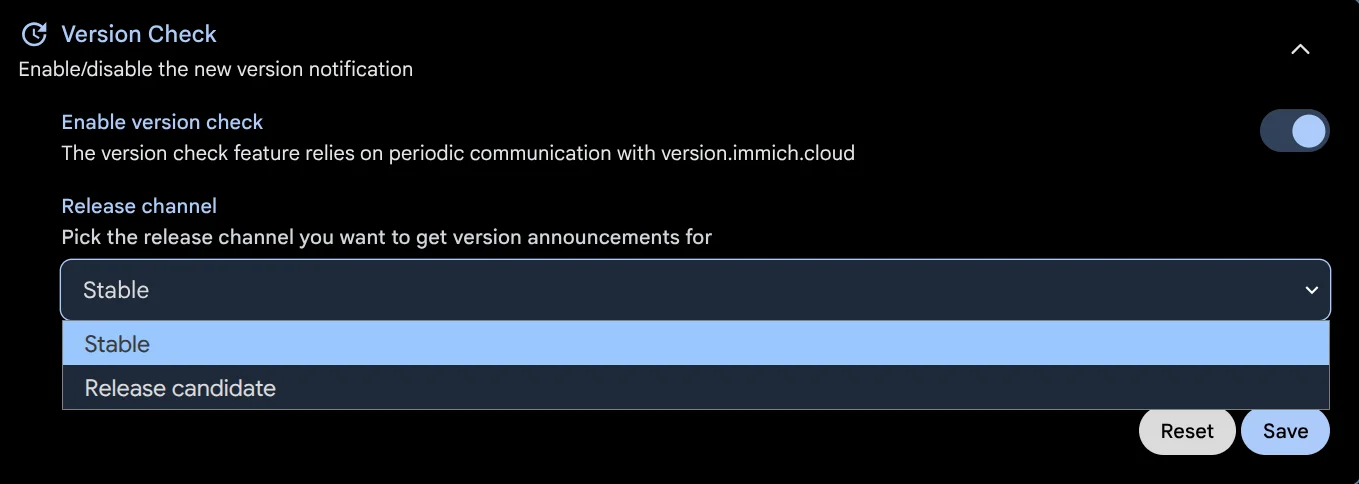
If you missed it, v3.0.0 was the first time we used release candidates, also known as prereleases. Release candidates are tested but not yet official releases of Immich, and they allow us to find and fix any outstanding bugs before a final release. If you would like to be notified about release candidates directly through Immich, you can change the release channel from "Stable" to "Release candidate" in the Admin settings > Version check options (here).
Breaking changes
This release includes several breaking changes; read the full migration guide here. It's worth mentioning that many of the breaking changes are updates to API endpoints and affect only third-party tools that integrate with Immich's API. For the vast majority of users, updating works exactly as it always has.
How to update
First, update the IMMICH_VERSION in your .env file to v3:
- IMMICH_VERSION=v2
+ IMMICH_VERSION=v3
Then run the usual update commands:
docker compose pull && docker compose up -dHighlights
Now, let's get right into all the new features in this release:
- Mobile non-destructive editing
- Workflows (preview)
- Background backup improvement
- Recently added page
- Slideshow on mobile app
- HLS and real-time video transcoding (preview)
- Open photo in Immich as gallery on Android
- OCR on mobile app
- Upload asset directly to album on the mobile app
- Option to select image size when sharing on the mobile app
- Perf: Timeline performance improvement for browsing a large amount of assets in a single month
Mobile non-destructive editing
This is a follow-up to Image Editing on the web, which was released in v2.5.0. This feature allows you to make non-destructive edits to your photos inside of Immich. Until now, the mobile editor used a completely different system that created new assets instead of editing the photo in place.
With this update, we bring a new, easier-to-use editor to mobile devices that has the same features as the web version. You can now edit photos directly in the mobile app, including cropping, rotating, and adjusting your images without ever touching the original file. Similar to the web, edits are non-destructive, so you can revisit or revert them at any time. You can even make edits on mobile and then adjust them on the web later!
Workflows (preview)
The first preview of Workflows is here! Workflows let you automate actions in your library by chaining triggers, filters, and actions together with a drag-and-drop builder. This is the foundation for many exciting automations to come, and we'd love your feedback as we continue building on it.
You can access the feature from Utilities > Workflows on the web.
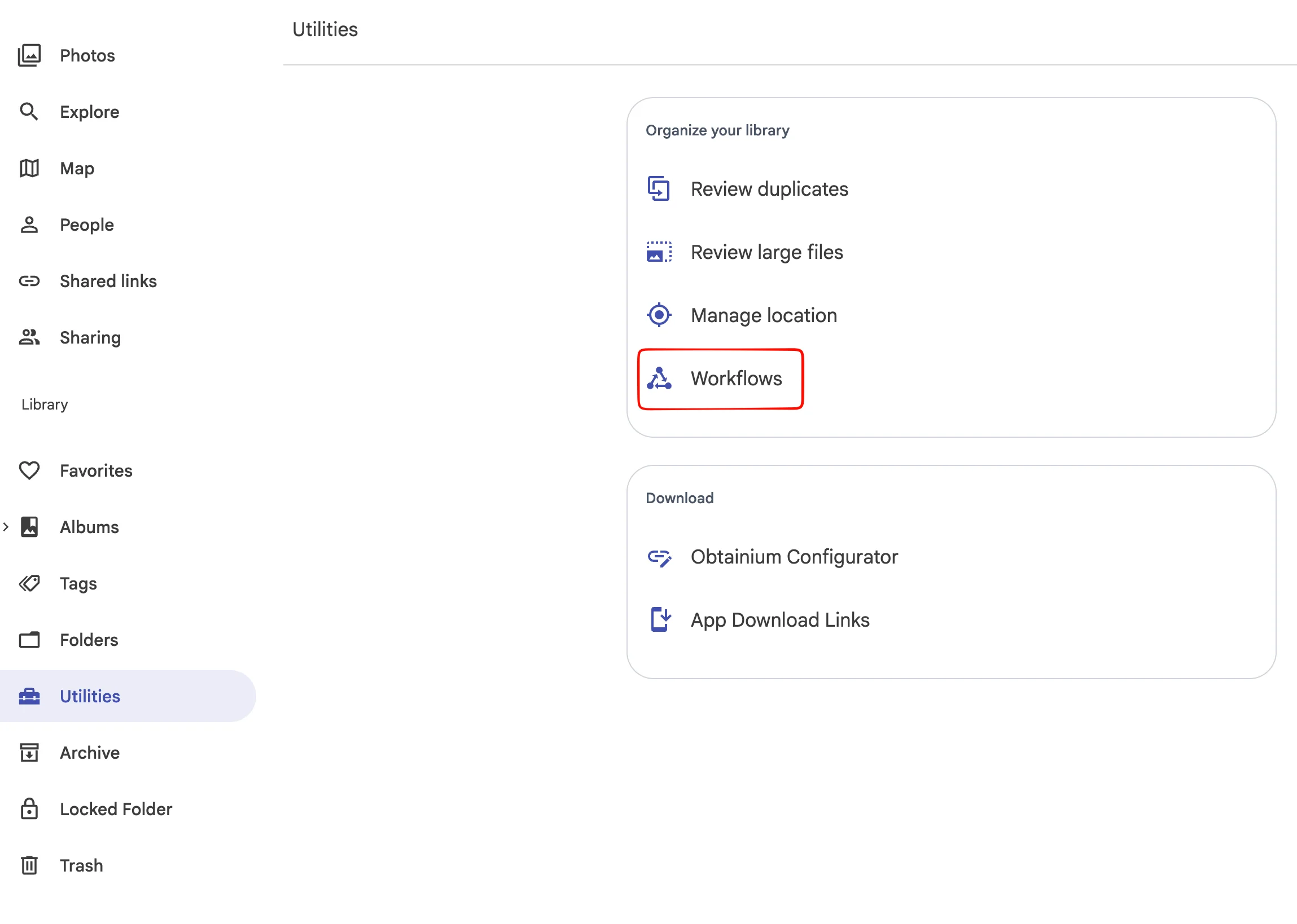
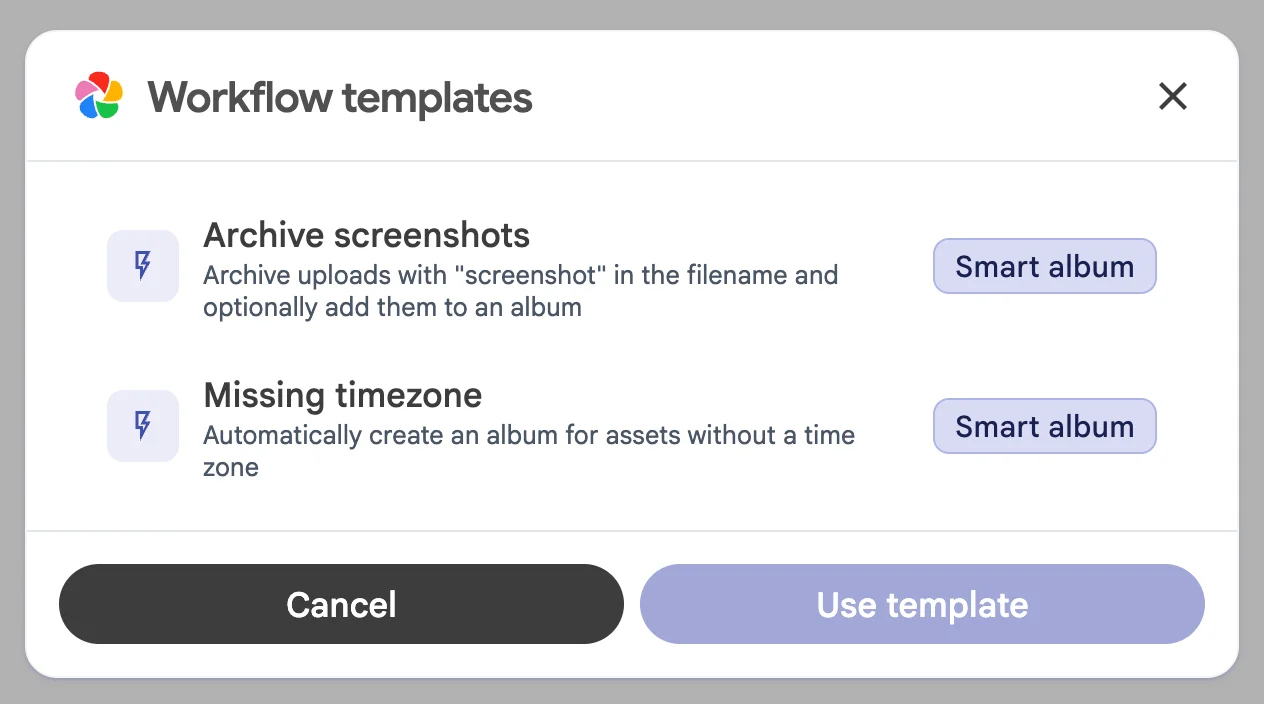
From there, you can either create a new blank workflow or browse the premade templates to get a basic understanding of how workflows can be used.
Workflows editor
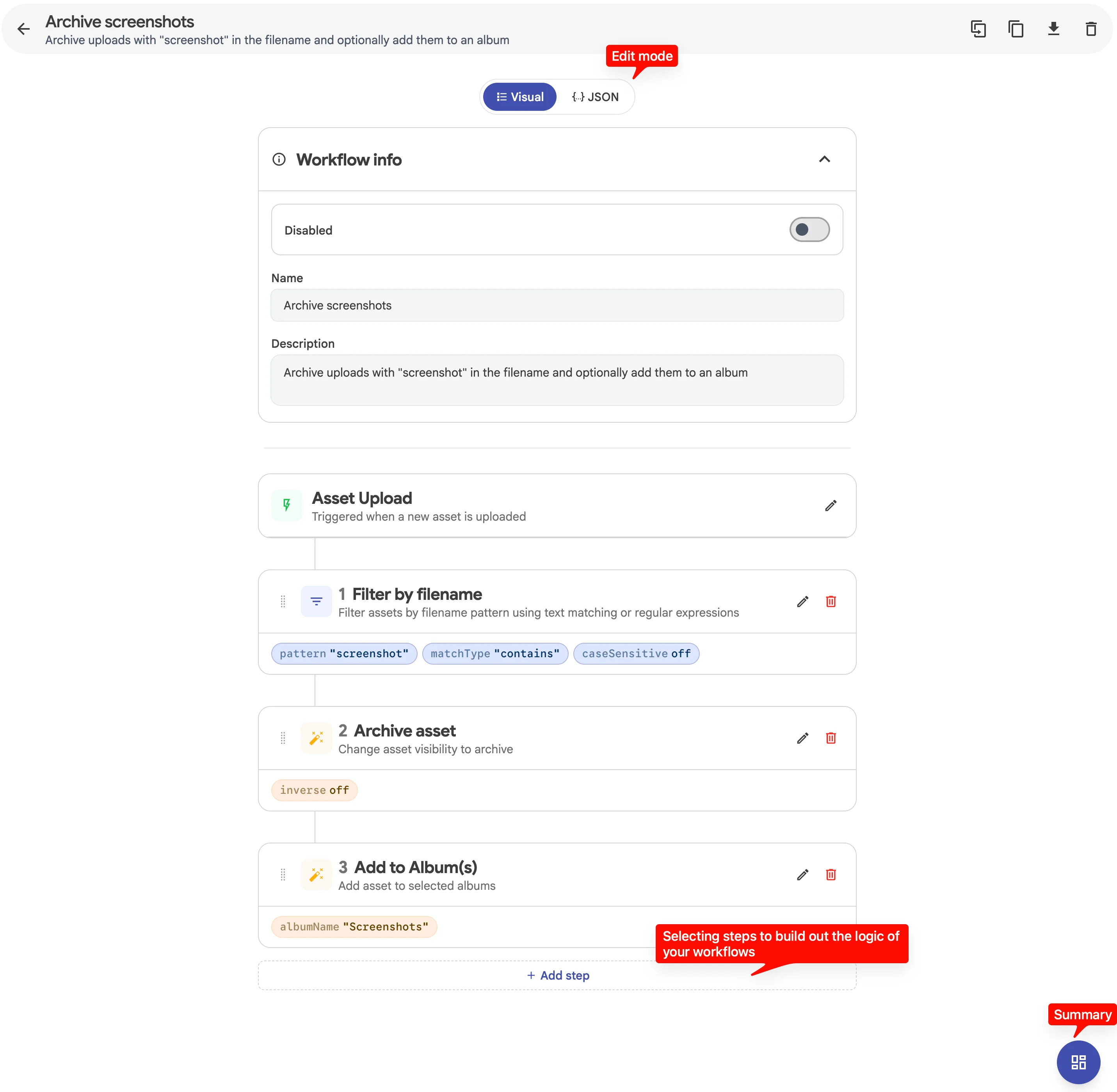
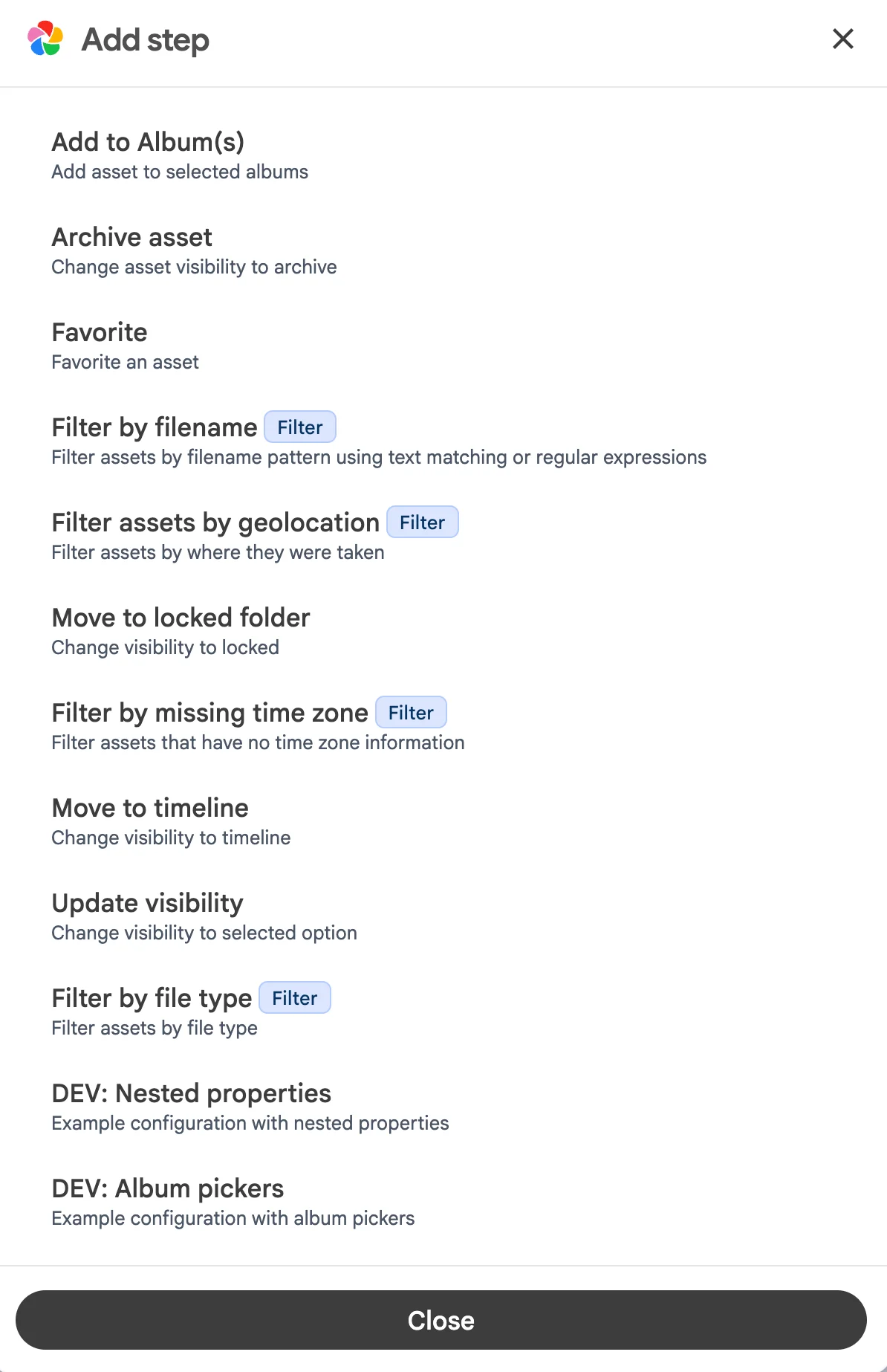
In the workflows editor, you can switch between the Visual or JSON editor. The visual editor is nice for building out the workflow; the JSON editor is nice for sharing and receiving workflow content from others.
In each workflow, there is a trigger and a sequence of steps.
- Trigger: this is the entry point of each workflow; when the trigger happens, the steps will be evaluated.
- Steps: they include Filters (conditions) and Actions (effect), they can be combined to produce the desired effect of the use case you aim for.
Sharing a workflow
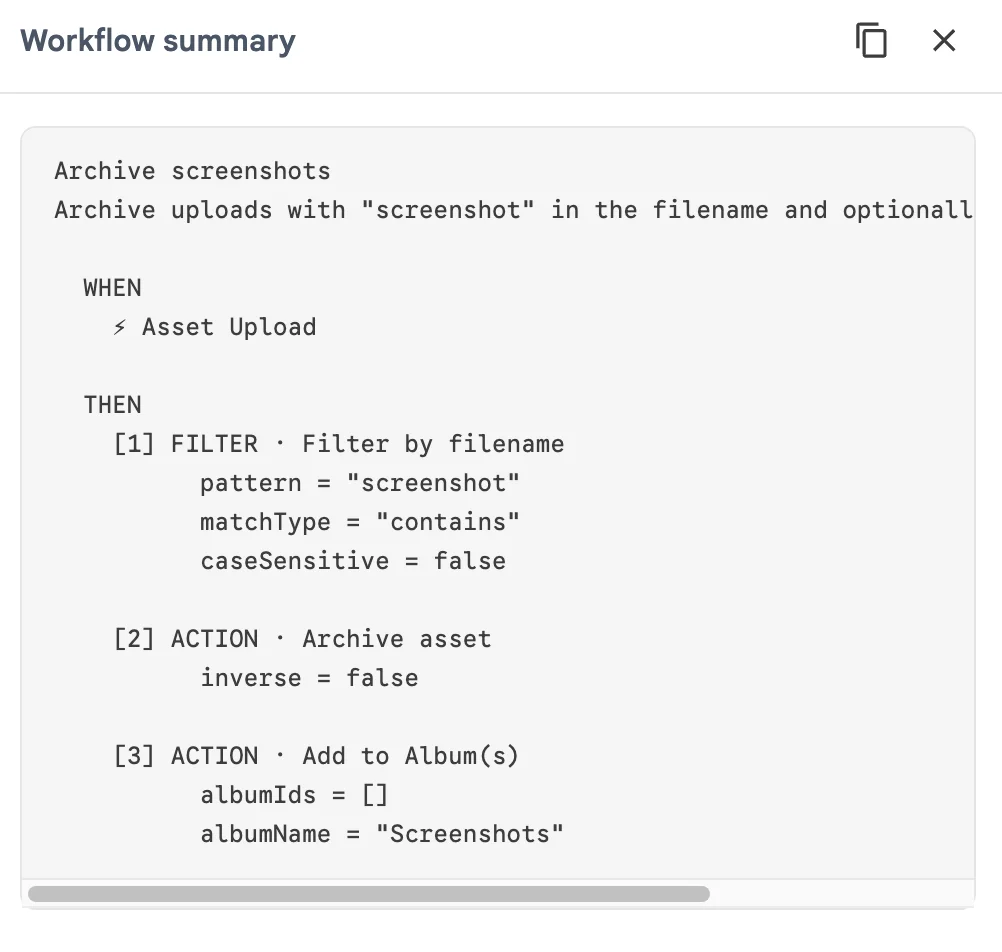
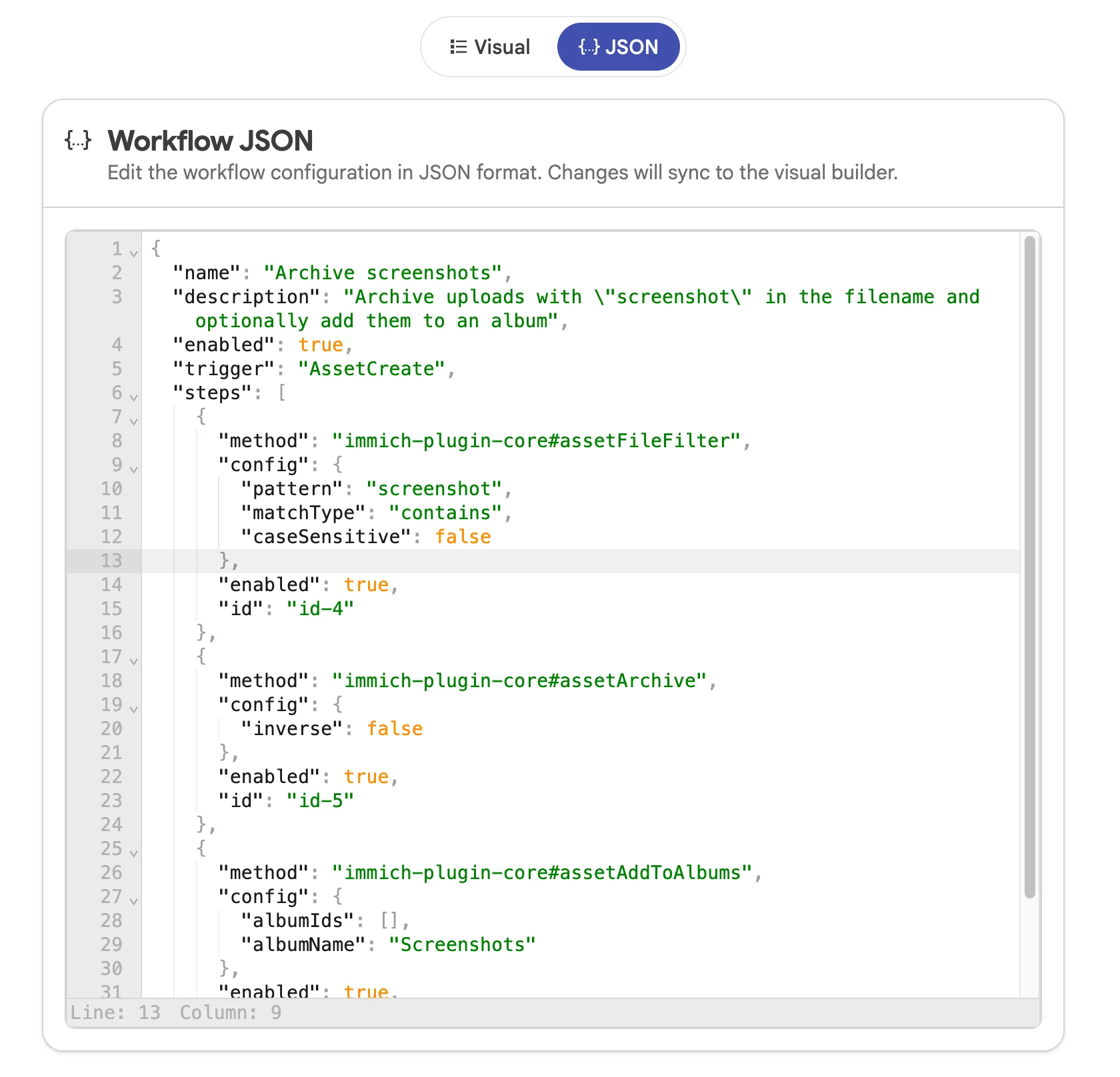
You can share the workflow you made with others in two ways; text and JSON. Text is nice for sharing on forum, for show-and-tell. JSON is nice for others to make an exact copy of your workflow's configuration.
Your can copy the text in the workflows summary panel on the lower right of the screen
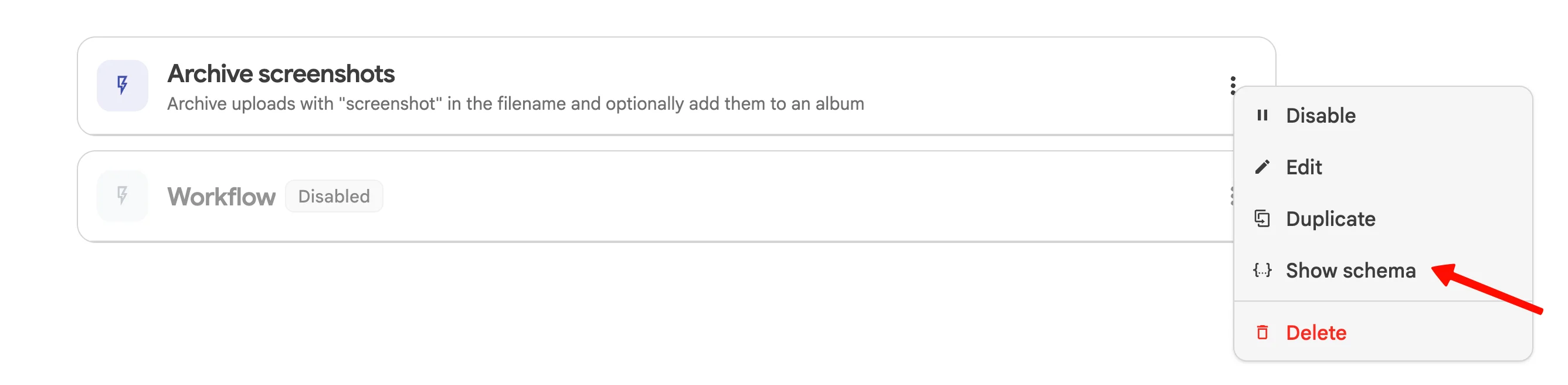
You can share the JSON content from the copy workflows button in the app bar, switch to the JSON editor, or use the Show schema button in the context menu in the workflows list
We are looking for extensive feedback and looking forward to receiving them from you all.
Background backup improvements
Background backup on Android is now significantly more reliable. The app uses a new periodic task scheduler that plays nicer with Android's background execution limits, properly cleans up tasks, and warns you when battery optimization and notification settings might interfere with backups.
On iOS, the background refresh task now runs its sync and upload work in parallel, so uploads actually start within the short time window iOS allows.
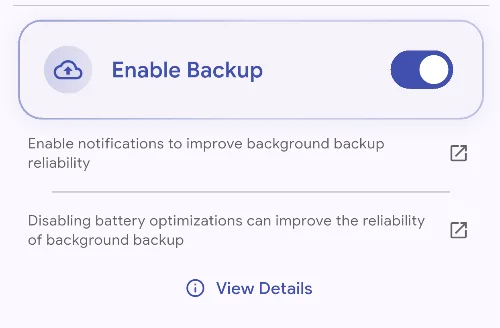
Recently added page
A new "Recently Added" page on the web and mobile lets you browse your library sorted by when assets were added to Immich, rather than when they were taken. This makes it easier to find what's new when browsing a new batch of imports. You can find the new page in the "Explore" tab on the web and in the "Search" tab on mobile.
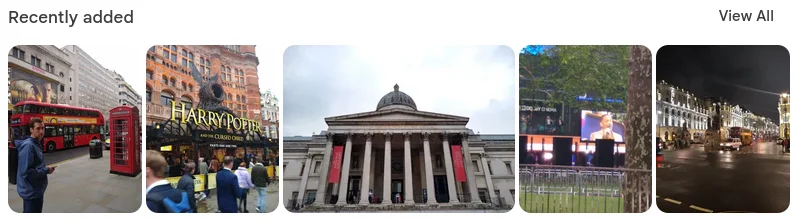
Slideshow (mobile)
The slideshow experience comes to mobile! You can now sit back and let your photos and videos play across the screen, just like on the web.

HLS and Real-Time Video transcoding (preview)
Immich can now transcode videos on-the-fly without needing to generate offline transcodes. This has been a long-requested feature with many benefits:
- Quality switching (both manual and automatic)
- Transcoding to the best codecs supported by the client
- Lower storage overhead when offline transcoding is disabled
- HDR for compatible clients (not implemented yet)
- Remuxing rather than transcoding the original when bandwidth allows it (not implemented yet)
Please note that this feature is still experimental and can change behavior from version to version. It's currently only implemented in the web app, with the mobile app implementation in progress.
To enable real-time transcoding, go to the video transcoding settings (scroll down). Offline transcoding isn't directly affected by enabling it, so if you'd like to disable offline transcoding, you should also adjust the transcode policy. For assets imported prior to v3, you may also need to re-run Metadata Extraction in the job panel for them to be re-processed.
![A screenshot of the Immich admin settings, showing a new section "Real-Time Transcoding [Experimental]"](https://static.immich.cloud/blog/f044daa9-6bea-47e9-a8c8-5e97e617530a/02cde673ceb45141c41472aea0f788c1.webp)
Keep in mind that your server needs to be powerful enough to transcode in real-time for this feature to work well. Hardware acceleration is recommended, but not required, when using this feature.
<Any stats/system usage here?>
New video player for web
A new custom video player on the web app ensures all your devices share the same controls and layout, matching the Immich design. Some basic functions, like changing the playback rate, are available. This should also fix a lot of the problems on iOS, where the OS's controls are hidden behind the Immich navbar.
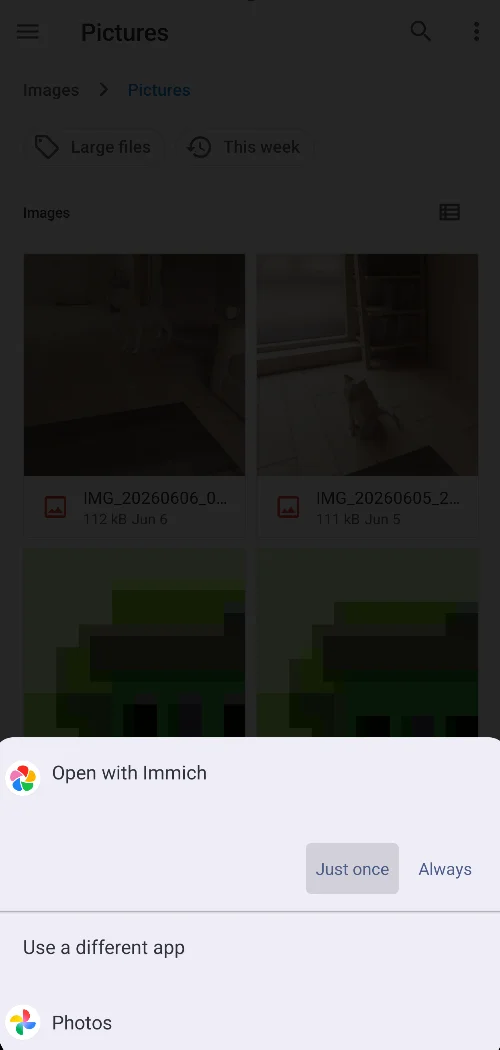
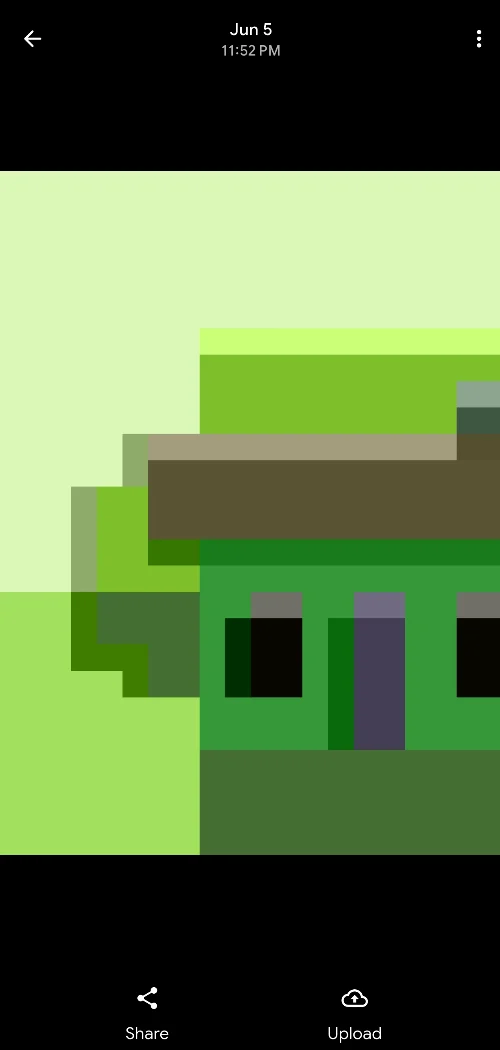
Open photos in Immich as a gallery on Android
Immich can now act as a gallery/image viewer app on Android. Tap a photo or video in another app, choose Immich, and it opens right in the asset viewer with actions for sharing the file or uploading it to your library.
This is the first iteration of the feature, and refinements to how Immich recognizes files that are already in your library are on the way
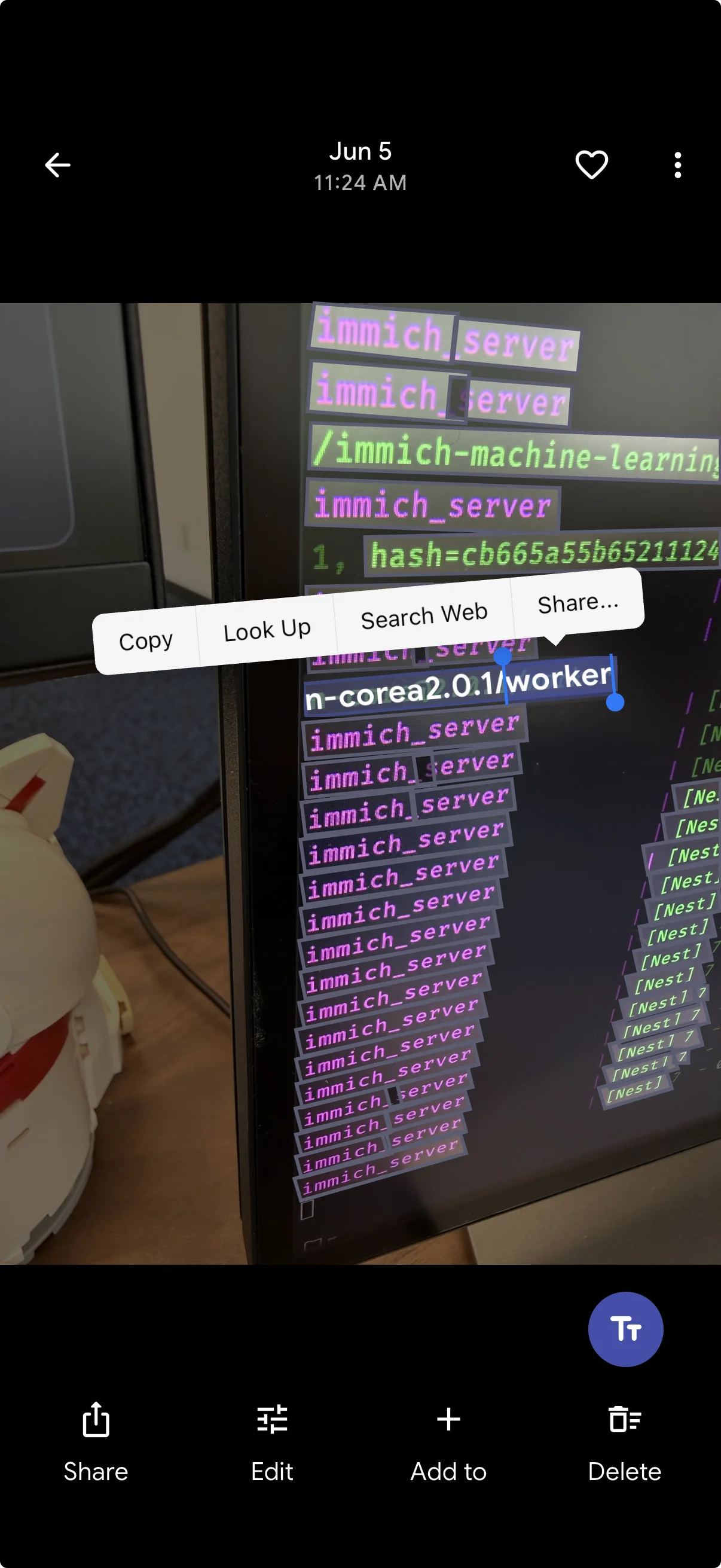
OCR on the mobile app
The asset viewer now has a toggle that highlights recognized text in a photo, and you can select and copy it directly from the image.
Upload assets directly to an album on mobile
You can now upload local photos directly to an album in the mobile app, including from the asset bottom sheet, instead of uploading first and organizing later. A small change that removes a lot of friction from the backup-and-organize flow.
Select image size when sharing on mobile
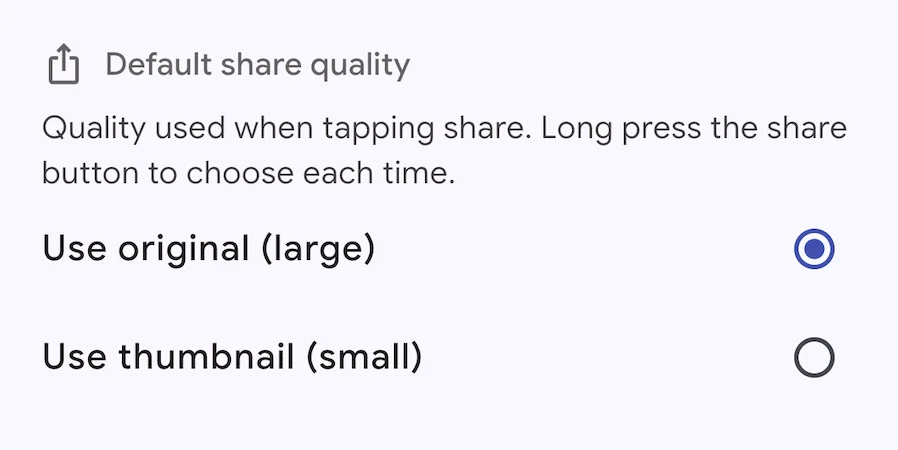
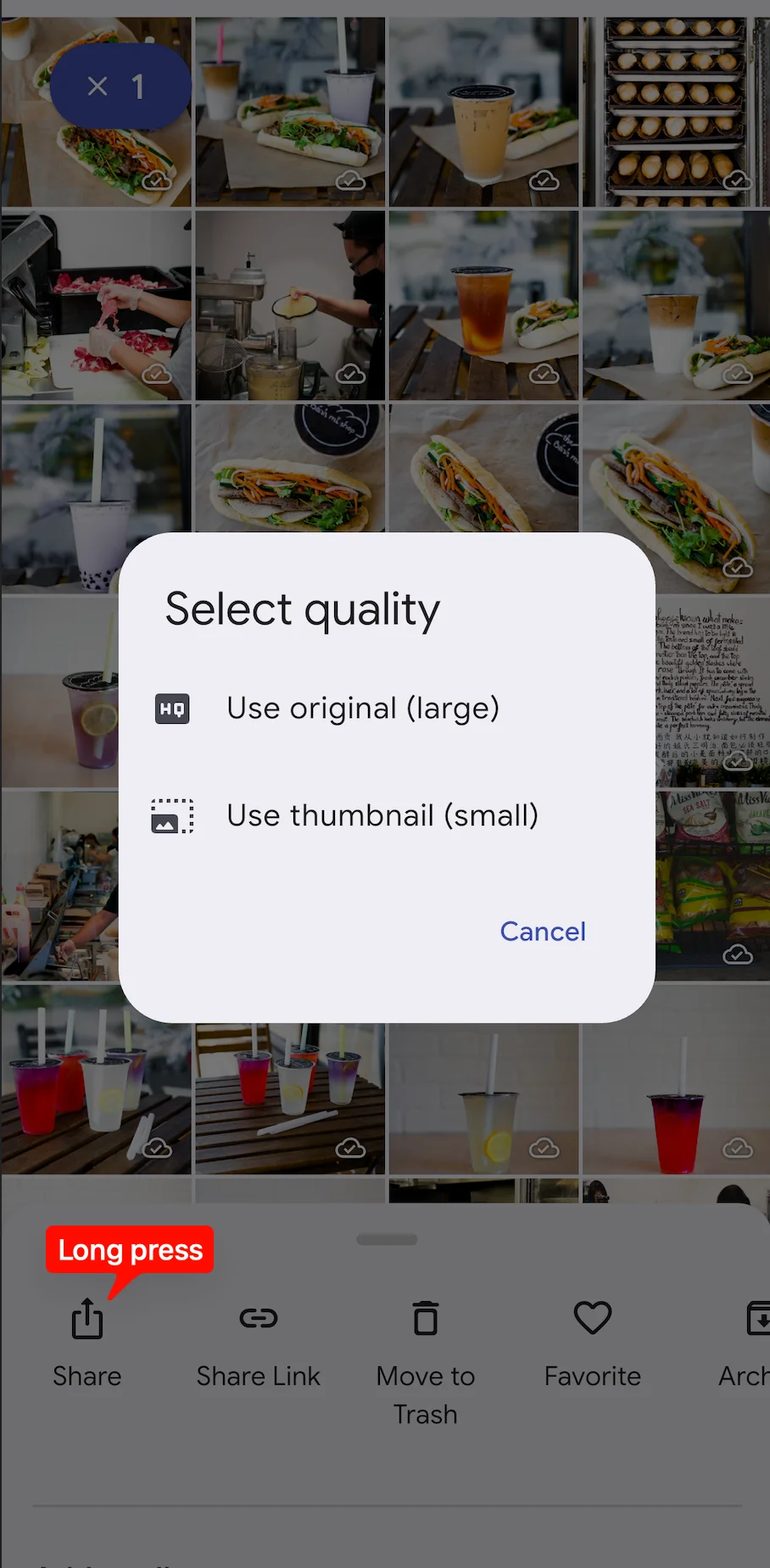
When sharing photos from the mobile app, you can now choose the image size before sending; it is handy for keeping shared files small for messaging apps while preserving the option to share at full quality when needed.
You can change the default behavior in the App Settings > Perferences
You can also pick the option when sharing on-the-fly by long pressing the Share button
Timeline performance Improvements
Browsing months with a huge number of assets is now dramatically smoother and prevents locking up the browser tab page when your instance runs into that scenario.
What's Changed
🚨 Breaking Changes
- refactor!: migrate class-validator to zod by @timonrieger in https://github.com/immich-app/immich/pull/26597
- refactor!: remove replace asset by @jrasm91 in https://github.com/immich-app/immich/pull/27022
- refactor!: remove my shared link dto by @jrasm91 in https://github.com/immich-app/immich/pull/27023
- chore!: remove deprecated env variables by @jrasm91 in https://github.com/immich-app/immich/pull/27802
- chore!: remove getRandom api endpoint by @bwees in https://github.com/immich-app/immich/pull/27780
- chore!: remove unused token response param by @jrasm91 in https://github.com/immich-app/immich/pull/27805
- refactor: yeet old timeline by @shenlong-tanwen in https://github.com/immich-app/immich/pull/27666
- chore!: remove old timeline sync endpoints by @jrasm91 in https://github.com/immich-app/immich/pull/27804
- chore!: remove deviceId and deviceAssetId by @danieldietzler in https://github.com/immich-app/immich/pull/27818
- chore!: rename API key schemas by @jrasm91 in https://github.com/immich-app/immich/pull/27828
- chore!: remove without assets by @jrasm91 in https://github.com/immich-app/immich/pull/27835
- fix: oauth issuerUrl validation by @bo0tzz in https://github.com/immich-app/immich/pull/27848
- fix!: do not allow insecure oauth requests by default by @bo0tzz in https://github.com/immich-app/immich/pull/27844
- fix!: set duration to null when not present by @meesfrensel in https://github.com/immich-app/immich/pull/26982
- chore!: remove /api/server/theme endpoint by @jrasm91 in https://github.com/immich-app/immich/pull/27880
- chore!: migrate album owner to album_user by @danieldietzler in https://github.com/immich-app/immich/pull/27467
- refactor!: change number to integer types by @timonrieger in https://github.com/immich-app/immich/pull/27912
- refactor(server)!: move correlationId to X-Correlation-ID response header by @timonrieger in https://github.com/immich-app/immich/pull/28139
- refactor(server)!: remove redundant error and statusCode fields from error responses by @timonrieger in https://github.com/immich-app/immich/pull/28140
- chore(server)!: drop pgvecto.rs support by @mertalev in https://github.com/immich-app/immich/pull/28159
- chore!: duration in milliseconds by @mertalev in https://github.com/immich-app/immich/pull/28003
- refactor(server)!: sanitize error messages to avoid leaking resource details by @timonrieger in https://github.com/immich-app/immich/pull/28154
- refactor(server)!: structured validation error responses by @timonrieger in https://github.com/immich-app/immich/pull/28204
- feat(server)!: add isOwned filter to albums API by @timonrieger in https://github.com/immich-app/immich/pull/28213
- chore(ml)!: require numpy 2.4 by @mertalev in https://github.com/immich-app/immich/pull/28158
- fix(deps): update dependency nestjs-otel to v8 by @renovate[bot] in https://github.com/immich-app/immich/pull/27863
- chore(ml)!: remove deprecated envs by @mertalev in https://github.com/immich-app/immich/pull/28326
- chore(server)!: remove libopus enum by @mertalev in https://github.com/immich-app/immich/pull/28325
- refactor!: remove asset faces from AssetResponseDto by @bwees in https://github.com/immich-app/immich/pull/27779
- refactor(server)!: drop empty string to null conversion by @timonrieger in https://github.com/immich-app/immich/pull/28808
- refactor(server)!: remove changeExpiryTime by @timonrieger in https://github.com/immich-app/immich/pull/28816
- refactor!: disallow star rating < 1 by @meesfrensel in https://github.com/immich-app/immich/pull/27896
🫥 Deprecated Changes
- refactor(server): deprecate PUT routes in favor of PATCH by @timonrieger in https://github.com/immich-app/immich/pull/28859
🔒 Security
- fix: run profile picture through thumbnail pipeline by @bo0tzz in https://github.com/immich-app/immich/pull/27890
🚀 Features
- feat: mobile editing by @bwees in https://github.com/immich-app/immich/pull/25397
- feat: album map markers endpoint by @jrasm91 in https://github.com/immich-app/immich/pull/27830
- feat(server): added backchannel logout api endpoint by @santanoce in https://github.com/immich-app/immich/pull/26235
- feat(server): add OIDC logout URL override option by @LJspice in https://github.com/immich-app/immich/pull/27389
- feat: android periodic work manager task by @shenlong-tanwen in https://github.com/immich-app/immich/pull/23563
- feat(web): custom video player controls by @meesfrensel in https://github.com/immich-app/immich/pull/26183
- feat(web): add full-path search mode to UI by @mws-weekend-projects in https://github.com/immich-app/immich/pull/26758
- feat: recently added assets page by @benbeckford in https://github.com/immich-app/immich/pull/28272
- feat(mobile): slideshow view by @benbeckford in https://github.com/immich-app/immich/pull/28421
- feat(mobile): "Add Tags" asset multiselect option by @benjamonnguyen in https://github.com/immich-app/immich/pull/26269
- feat: workflows & plugins by @jrasm91 in https://github.com/immich-app/immich/pull/26727
- feat(server): hls with real-time transcoding by @mertalev in https://github.com/immich-app/immich/pull/28230
- feat(web): hls player by @mertalev in https://github.com/immich-app/immich/pull/28312
- feat(mobile): Android. Immich as a gallery / image viewer app by @PeterOmbodi in https://github.com/immich-app/immich/pull/26109
- feat: user upload heatmap by @bondeabhijeet in https://github.com/immich-app/immich/pull/28593
- feat(mobile): ocr support by @YarosMallorca in https://github.com/immich-app/immich/pull/26523
- feat: geolocation workflow filter by @benbeckford in https://github.com/immich-app/immich/pull/28961
- feat: image quality option in sharing by @alextran1502 in https://github.com/immich-app/immich/pull/28918
- feat: integrity check jobs (missing files, untracked files, checksums) by @insertish in https://github.com/immich-app/immich/pull/24205
🌟 Enhancements
- feat(web): persist state of file path information in details panel by @cratoo in https://github.com/immich-app/immich/pull/27770
- feat: commands by @jrasm91 in https://github.com/immich-app/immich/pull/27546
- feat: upgrade immich/ui by @jrasm91 in https://github.com/immich-app/immich/pull/27792
- feat: filter users on share by @OdinOxin in https://github.com/immich-app/immich/pull/27732
- fix(server): render storage template date/time tokens in UTC (#24350) by @migpovrap in https://github.com/immich-app/immich/pull/26917
- feat(web): lazy load library and server statistics by @etnoy in https://github.com/immich-app/immich/pull/26406
- feat: sort users alphabetically when adding to album by @OdinOxin in https://github.com/immich-app/immich/pull/27731
- feat: auth logout page by @jrasm91 in https://github.com/immich-app/immich/pull/27831
- chore: improve randomness of /search/random endpoint by @StevenMassaro in https://github.com/immich-app/immich/pull/27531
- feat: dynamic languages by @jrasm91 in https://github.com/immich-app/immich/pull/27869
- feat: cache shared link by @danieldietzler in https://github.com/immich-app/immich/pull/27889
- feat(server): add configurable OAuth prompt parameter by @sparsh985 in https://github.com/immich-app/immich/pull/26755
- feat(server): add MPO file type support by @git-akihakune in https://github.com/immich-app/immich/pull/27963
- feat(mobile): action bottom sheet on map timeline by @YarosMallorca in https://github.com/immich-app/immich/pull/27515
- feat(server): track video metadata by @mertalev in https://github.com/immich-app/immich/pull/28023
- feat(enhancement): Navigate stack with up and down arrow keys by @cratoo in https://github.com/immich-app/immich/pull/27854
- fix(web): migrate people management component to page, enabling tooltips by @SkyDev125 in https://github.com/immich-app/immich/pull/26971
- chore(mobile): add box shadow to asset details by @uhthomas in https://github.com/immich-app/immich/pull/27510
- feat: hide hidden person from memories by @sakshamchawla in https://github.com/immich-app/immich/pull/20877
- feat(mobile): increased tap area on video player overlay by @YarosMallorca in https://github.com/immich-app/immich/pull/27269
- feat(web): Add metadata overlay to slideshow by @timonrieger in https://github.com/immich-app/immich/pull/24627
- feat(web): add individual filter removal from search result chips by @timonrieger in https://github.com/immich-app/immich/pull/28166
- feat(mobile): trash/restore all by @YarosMallorca in https://github.com/immich-app/immich/pull/28116
- feat: display more info in asset viewer by @alextran1502 in https://github.com/immich-app/immich/pull/24630
- feat(server): allow subpaths for machine learning URL by @gnojus in https://github.com/immich-app/immich/pull/28427
- feat(ui): Shared URL input configuration by @Lauritz-Tieste in https://github.com/immich-app/immich/pull/27105
- refactor: enhance shared link UI and functionality by @Lauritz-Tieste in https://github.com/immich-app/immich/pull/26464
- feat: upload and add local asset directly to album by @alextran1502 in https://github.com/immich-app/immich/pull/28123
- feat: Selectable metadata in duplicates utility with diffing by @ollioddi in https://github.com/immich-app/immich/pull/26328
- fix: improve form control focus visibility by @Caltsic in https://github.com/immich-app/immich/pull/28512
- feat: command for user pages by @alextran1502 in https://github.com/immich-app/immich/pull/28554
- refactor: use ControlBar UI Library component by @bwees in https://github.com/immich-app/immich/pull/28567
- feat: workflow template by @alextran1502 in https://github.com/immich-app/immich/pull/28553
- feat(mobile): improve downloading algorithm for sharing by @YarosMallorca in https://github.com/immich-app/immich/pull/27312
- feat: search by album name and id by @jrasm91 in https://github.com/immich-app/immich/pull/28672
- feat: upload local assets to album from bottom sheet by @alextran1502 in https://github.com/immich-app/immich/pull/28531
- feat: places in context search by @timonrieger in https://github.com/immich-app/immich/pull/28768
- feat: minimum face count per user by @timjonez in https://github.com/immich-app/immich/pull/27452
- feat: show notification and battery optimization warning by @shenlong-tanwen in https://github.com/immich-app/immich/pull/26610
- feat: workflows drag and drop enhancements by @danieldietzler in https://github.com/immich-app/immich/pull/28764
- feat(mobile): min face count per-user by @YarosMallorca in https://github.com/immich-app/immich/pull/28805
- refactor(server): allow -1 rating again by @timonrieger in https://github.com/immich-app/immich/pull/28886
- feat(web): warn before overwriting existing locations in geolocation utility by @yoshovski in https://github.com/immich-app/immich/pull/28840
- feat: warn if microservices worker is missing by @bo0tzz in https://github.com/immich-app/immich/pull/28869
🐛 Bug fixes
- fix(web): center images in RTL layouts (#27678) by @Nicolas-micuda-becker in https://github.com/immich-app/immich/pull/27753
- fix(mobile): add keys for person tiles in search by @YarosMallorca in https://github.com/immich-app/immich/pull/27689
- fix(web): selection clearing on preview by @YarosMallorca in https://github.com/immich-app/immich/pull/27702
- fix: asset multi select download shortcut by @danieldietzler in https://github.com/immich-app/immich/pull/27784
- fix(web): add partner photo to album from multiselect by @YarosMallorca in https://github.com/immich-app/immich/pull/27767
- fix: redirect original by @danieldietzler in https://github.com/immich-app/immich/pull/27759
- fix: make web build stage deterministic by @bo0tzz in https://github.com/immich-app/immich/pull/27823
- fix(web): svelte regression - cancel video preview fetch when bind:this is cleared early by @midzelis in https://github.com/immich-app/immich/pull/27713
- fix(web): stale adaptive image when original overlays preview by @midzelis in https://github.com/immich-app/immich/pull/27621
- fix(mobile): readonly redirect when not logged in by @YarosMallorca in https://github.com/immich-app/immich/pull/27728
- fix(web): close edit faces panel on Escape key press by @midzelis in https://github.com/immich-app/immich/pull/27519
- fix(oauth): normalize email claim to lowercase and trim before account lookup and registration by @timdobras in https://github.com/immich-app/immich/pull/26841
- fix(web): use event for zooming out after opening face editor by @meesfrensel in https://github.com/immich-app/immich/pull/27789
- fix: sanitize filenames before adding to zip by @bo0tzz in https://github.com/immich-app/immich/pull/27893
- fix(server): require at least one field to be set when updating memory by @fredfloydd in https://github.com/immich-app/immich/pull/27842
- fix(web): compute hashes for uploads in chunks by @fredfloydd in https://github.com/immich-app/immich/pull/27878
- fix(web): fix stale album page load by @fredfloydd in https://github.com/immich-app/immich/pull/27825
- fix(web): prevent interaction with detail panel behind person side panel by @midzelis in https://github.com/immich-app/immich/pull/27309
- fix: show neon light by @alextran1502 in https://github.com/immich-app/immich/pull/27994
- fix(mobile): zero exposure by @YarosMallorca in https://github.com/immich-app/immich/pull/28017
- fix(mobile): clear local data on forced logout by @LeLunZ in https://github.com/immich-app/immich/pull/27957
- fix(mobile): enable autoplay for motion photos in video viewer by @LeLunZ in https://github.com/immich-app/immich/pull/27961
- fix(mobile): thumbnail transition to asset viewer by @LeLunZ in https://github.com/immich-app/immich/pull/27850
- fix: jump to timeline on new auto_router update by @alextran1502 in https://github.com/immich-app/immich/pull/28022
- fix(mobile): delete assets on trash empty, Android by @PeterOmbodi in https://github.com/immich-app/immich/pull/26070
- fix(ml): handle empty/corrupt images in face detection by @yosit in https://github.com/immich-app/immich/pull/27391
- fix(web): refresh memories hourly by @meesfrensel in https://github.com/immich-app/immich/pull/28114
- fix(web): large files: better handling of asset deletions by @meesfrensel in https://github.com/immich-app/immich/pull/28117
- fix(web): double video playback on map timeline by @YarosMallorca in https://github.com/immich-app/immich/pull/28090
- fix(mobile): suppress asset stack UI in trash timeline by @PeterOmbodi in https://github.com/immich-app/immich/pull/26536
- fix(web): timeline scroll when pressing back from stacked asset by @Snowknight26 in https://github.com/immich-app/immich/pull/28163
- fix(server): selectively apply metadata bitstream filter for video thumbnails by @pinhao in https://github.com/immich-app/immich/pull/28162
- fix(web): fix shared link /s/photos.* navigation after password login by @meesfrensel in https://github.com/immich-app/immich/pull/27788
- fix(ml): respect time zone for logs in cuda container by @AyaanMAG in https://github.com/immich-app/immich/pull/28155
- fix: librknnrt permissions in machine-learning by @DavidTheFighter in https://github.com/immich-app/immich/pull/28216
- fix(server): validate duplicate group ownership before dismissal by @timonrieger in https://github.com/immich-app/immich/pull/28221
- fix(web): correct timeline yesterday label across month boundaries by @michelheusschen in https://github.com/immich-app/immich/pull/28183
- fix(mobile): show lens info without lens name by @benbeckford in https://github.com/immich-app/immich/pull/28234
- fix: stale person name after merge by @danieldietzler in https://github.com/immich-app/immich/pull/28222
- fix(web): shared album avatars opening modal by @meesfrensel in https://github.com/immich-app/immich/pull/26719
- fix(mobile): prevent asset loading issues when changing page or when closing memories by @LeLunZ in https://github.com/immich-app/immich/pull/27596
- fix(mobile): correct filter default and UI desync in similar photos search by @TheBestX11 in https://github.com/immich-app/immich/pull/27516
- fix(server): hide isFavorite from partner asset sync stream by @timonrieger in https://github.com/immich-app/immich/pull/28035
- fix(mobile): restore notification plugin init by @santoshakil in https://github.com/immich-app/immich/pull/28284
- fix(mobile): mounted check before setState in album sync action by @santoshakil in https://github.com/immich-app/immich/pull/28300
- fix(mobile): avoid duplicate assets in album view by @stfn42 in https://github.com/immich-app/immich/pull/28152
- fix(mobile): Deduplicate assets in person view timeline by @thowdev in https://github.com/immich-app/immich/pull/26723
- fix(deployment): remove unneeded volume by @mmomjian in https://github.com/immich-app/immich/pull/28307
- fix: mobile upload duration type by @alextran1502 in https://github.com/immich-app/immich/pull/28362
- fix: deep link for assets when asset viewer already open by @bwees in https://github.com/immich-app/immich/pull/27971
- fix: kekab icon colors in light mode by @shenlong-tanwen in https://github.com/immich-app/immich/pull/28366
- fix: indexes on remote_asset_entity by @shenlong-tanwen in https://github.com/immich-app/immich/pull/28264
- fix(mobile): clear linkedRemoteAlbumId in reset() so FK refs dont dangle by @santoshakil in https://github.com/immich-app/immich/pull/28382
- fix: ignore icc profile make and model by @jrasm91 in https://github.com/immich-app/immich/pull/28412
- fix(mobile): don't block app open on slow validateAccessToken by @santoshakil in https://github.com/immich-app/immich/pull/28405
- fix(mobile): add restore option to trashed assets by @inesiscosta in https://github.com/immich-app/immich/pull/27442
- fix(mobile): use correct delete action by @ByteSizedMarius in https://github.com/immich-app/immich/pull/26575
- fix(server): dedupe database backup jobs by @rdeaton in https://github.com/immich-app/immich/pull/28341
- fix(mobile): cronet buffer overflow on compressed thumbnails by @santoshakil in https://github.com/immich-app/immich/pull/28439
- fix(mobile): cronet thumbnail buffer overflow regression from #28439 by @santoshakil in https://github.com/immich-app/immich/pull/28450
- fix(mobile): mounted check in ThumbnailTile hero flight listener by @santoshakil in https://github.com/immich-app/immich/pull/28451
- fix(mobile): don't force-unwrap nil localizedTitle in ios getAlbums by @santoshakil in https://github.com/immich-app/immich/pull/28452
- fix(web): work around Chrome HDR image seam lines during zoom by @midzelis in https://github.com/immich-app/immich/pull/27715
- fix(ios): respect status bar scroll to top in timeline views by @agg23 in https://github.com/immich-app/immich/pull/28469
- fix(mobile): asset viewer stuck on spinner after rotation by @LeLunZ in https://github.com/immich-app/immich/pull/28019
- fix(web): timeline stuttering with many assets in 1 day by @benbeckford in https://github.com/immich-app/immich/pull/28509
- fix(mobile): preserve zoom level during image loading and live photo playback by @LeLunZ in https://github.com/immich-app/immich/pull/27960
- fix(ml): stabilize MIGraphX inference by @fabianwimberger in https://github.com/immich-app/immich/pull/28444
- fix: await sync asset v2 by @bwees in https://github.com/immich-app/immich/pull/28569
- fix: strip metadata from timeline responses for shared links without exif sharing by @danieldietzler in https://github.com/immich-app/immich/pull/28644
- fix: Refresh local album overview page after asset deletion by @Lauritz-Tieste in https://github.com/immich-app/immich/pull/28586
- fix(server): prevent locked assets from leaking to partners by @timonrieger in https://github.com/immich-app/immich/pull/28652
- refactor(web): replace per-asset viewport proximity with day-tier active indices by @midzelis in https://github.com/immich-app/immich/pull/28597
- fix: timeline scroll flicker by @alextran1502 in https://github.com/immich-app/immich/pull/28653
- fix: api repositories using stale endpoint by @shenlong-tanwen in https://github.com/immich-app/immich/pull/28667
- fix: disallow cross origin/non http protocols for continueUrl on login by @bwees in https://github.com/immich-app/immich/pull/28706
- fix(web): skip thumbhash fade for offscreen thumbnails by @midzelis in https://github.com/immich-app/immich/pull/27335
- fix(web): prevent partner assets from being selected in geolocation utility by @okxint in https://github.com/immich-app/immich/pull/28737
- fix(mobile): invisible ink splashes in asset sheet by @timonrieger in https://github.com/immich-app/immich/pull/28756
- fix!: unauthorized face creation by @shenlong-tanwen in https://github.com/immich-app/immich/pull/28561
- fix(mobile): proper background task cleanup by @mertalev in https://github.com/immich-app/immich/pull/28694
- fix(cli): prevent out-of-memory on file upload due to undici storing the request body by @moversity in https://github.com/immich-app/immich/pull/28723
- fix: error log on aborted uploads by @jrasm91 in https://github.com/immich-app/immich/pull/28806
- fix(server): respect timezone in iso date string encoding by @timonrieger in https://github.com/immich-app/immich/pull/28810
- test: fix tests when OpenVINO provider is available by @nekowinston in https://github.com/immich-app/immich/pull/28802
- fix(mobile): run iOS bg task phases in parallel by @santoshakil in https://github.com/immich-app/immich/pull/28293
- fix: error handling by @jrasm91 in https://github.com/immich-app/immich/pull/28843
- fix: cross isolate drift watchers by @shenlong-tanwen in https://github.com/immich-app/immich/pull/28862
- fix: reload timeline on group by setting change by @shenlong-tanwen in https://github.com/immich-app/immich/pull/28864
- fix(web): use irot/imir tags for HEIF Orientation by @joojoooo in https://github.com/immich-app/immich/pull/27820
- fix: detail panel faces reactivity issues by @danieldietzler in https://github.com/immich-app/immich/pull/28910
- fix(server): hide isFavorite from album asset sync stream by @timonrieger in https://github.com/immich-app/immich/pull/28923
- fix(mobile): show memory and folder dates in local time by @santoshakil in https://github.com/immich-app/immich/pull/28941
- fix(mobile): show error when creating an album fails by @santoshakil in https://github.com/immich-app/immich/pull/28942
- fix(mobile): add album picker to archive bottom sheet by @santoshakil in https://github.com/immich-app/immich/pull/28953
- fix: normalize diacritics in person name search in Web & Mobile by @pedrovieira in https://github.com/immich-app/immich/pull/28887
- fix(web): Prevent face editor from closing when dismissing tag confirmation by @pedrovieira in https://github.com/immich-app/immich/pull/28900
- fix(mobile): map timeline layout crash by @YarosMallorca in https://github.com/immich-app/immich/pull/28878
- fix(mobile): deduplicate people in asset details panel by @santoshakil in https://github.com/immich-app/immich/pull/28972
- fix(mobile): keep timezone when editing asset date time by @santoshakil in https://github.com/immich-app/immich/pull/28978
- fix(mobile): stale details after editing asset date by @santoshakil in https://github.com/immich-app/immich/pull/28977
- fix(mobile): show albums whose assets are all trashed by @santoshakil in https://github.com/immich-app/immich/pull/28985
- fix(mobile): give android notification channels proper names by @santoshakil in https://github.com/immich-app/immich/pull/28986
- fix: Improving scroll behavior on image stacks that overflow the screen by @BlankCanvasStudio in https://github.com/immich-app/immich/pull/28885
- fix(web): focus on scrollable element on load by @timonrieger in https://github.com/immich-app/immich/pull/29004
📚 Documentation
- fix(docs): instructions on how to use local immich ui by @YarosMallorca in https://github.com/immich-app/immich/pull/27813
- fix(docs): helmet file affected containers by @mmomjian in https://github.com/immich-app/immich/pull/27939
- fix(docs): Update Tailscale free tier user and device limits by @Hakuin123 in https://github.com/immich-app/immich/pull/28151
- docs: update rocm installation instructions by @aigarius in https://github.com/immich-app/immich/pull/25434
- fix(docs): document
upgrade-insecure-requestsdefault by @meesfrensel in https://github.com/immich-app/immich/pull/28279 - fix(docs): missing colon in config file doc by @SuperSandro2000 in https://github.com/immich-app/immich/pull/28313
- fix: update server-commands subcommand list by @bo0tzz in https://github.com/immich-app/immich/pull/28402
- feat(docs): add fixed subnet guide for Synology to prevent firewall issues by @racehd in https://github.com/immich-app/immich/pull/26554
- chore(docs): update FAQ with profile picture change instructions by @tvangemert in https://github.com/immich-app/immich/pull/28634
- chore: update documentation to use mise commands by @timonrieger in https://github.com/immich-app/immich/pull/28515
- fix(docs): v3 bumps by @mmomjian in https://github.com/immich-app/immich/pull/29007
🌐 Translations
- feat: latest language requests by @danieldietzler in https://github.com/immich-app/immich/pull/28858
- chore: update translations by @weblate in https://github.com/immich-app/immich/pull/27764
New Contributors
- @OdinOxin made their first contribution in https://github.com/immich-app/immich/pull/27732
- @migpovrap made their first contribution in https://github.com/immich-app/immich/pull/26917
- @StevenMassaro made their first contribution in https://github.com/immich-app/immich/pull/27531
- @timdobras made their first contribution in https://github.com/immich-app/immich/pull/26841
- @santanoce made their first contribution in https://github.com/immich-app/immich/pull/26235
- @fredfloydd made their first contribution in https://github.com/immich-app/immich/pull/27842
- @sparsh985 made their first contribution in https://github.com/immich-app/immich/pull/26755
- @LJspice made their first contribution in https://github.com/immich-app/immich/pull/27389
- @git-akihakune made their first contribution in https://github.com/immich-app/immich/pull/27963
- @shaun0927 made their first contribution in https://github.com/immich-app/immich/pull/27900
- @yosit made their first contribution in https://github.com/immich-app/immich/pull/27391
- @Hakuin123 made their first contribution in https://github.com/immich-app/immich/pull/28151
- @pinhao made their first contribution in https://github.com/immich-app/immich/pull/28162
- @AyaanMAG made their first contribution in https://github.com/immich-app/immich/pull/28155
- @DavidTheFighter made their first contribution in https://github.com/immich-app/immich/pull/28216
- @benbeckford made their first contribution in https://github.com/immich-app/immich/pull/28234
- @bhugh made their first contribution in https://github.com/immich-app/immich/pull/27884
- @SkyDev125 made their first contribution in https://github.com/immich-app/immich/pull/26971
- @aigarius made their first contribution in https://github.com/immich-app/immich/pull/25434
- @mws-weekend-projects made their first contribution in https://github.com/immich-app/immich/pull/26758
- @TheBestX11 made their first contribution in https://github.com/immich-app/immich/pull/27516
- @sakshamchawla made their first contribution in https://github.com/immich-app/immich/pull/20877
- @santoshakil made their first contribution in https://github.com/immich-app/immich/pull/28284
- @stfn42 made their first contribution in https://github.com/immich-app/immich/pull/28152
- @thowdev made their first contribution in https://github.com/immich-app/immich/pull/26723
- @SuperSandro2000 made their first contribution in https://github.com/immich-app/immich/pull/28313
- @racehd made their first contribution in https://github.com/immich-app/immich/pull/26554
- @inesiscosta made their first contribution in https://github.com/immich-app/immich/pull/27442
- @gnojus made their first contribution in https://github.com/immich-app/immich/pull/28427
- @rdeaton made their first contribution in https://github.com/immich-app/immich/pull/28341
- @agg23 made their first contribution in https://github.com/immich-app/immich/pull/28469
- @ollioddi made their first contribution in https://github.com/immich-app/immich/pull/26328
- @Caltsic made their first contribution in https://github.com/immich-app/immich/pull/28512
- @fabianwimberger made their first contribution in https://github.com/immich-app/immich/pull/28444
- @tvangemert made their first contribution in https://github.com/immich-app/immich/pull/28634
- @BlankCanvasStudio made their first contribution in https://github.com/immich-app/immich/pull/28620
- @pneuly made their first contribution in https://github.com/immich-app/immich/pull/28610
- @timjonez made their first contribution in https://github.com/immich-app/immich/pull/27452
- @moversity made their first contribution in https://github.com/immich-app/immich/pull/28723
- @nekowinston made their first contribution in https://github.com/immich-app/immich/pull/28802
- @bondeabhijeet made their first contribution in https://github.com/immich-app/immich/pull/28593
- @joojoooo made their first contribution in https://github.com/immich-app/immich/pull/27820
- @pedrovieira made their first contribution in https://github.com/immich-app/immich/pull/28887
- @yoshovski made their first contribution in https://github.com/immich-app/immich/pull/28840
Full Changelog: https://github.com/immich-app/immich/compare/v2.7.5...v3.0.0-rc.0
Cheers,
The Immich Team